Skip to content

X Posts

XRMToolbox – SQL 4 CDS does not open

Had issues getting SQL 4 CDS to open. I tried reinstalling the plugin and the app, and that didn’t work. Finally went to …\AppData\Roaming\MscrmTools\XrmToolBox\Settings and deleted a file there called “MarkMpn.Sql4Cds.xml”. That seemed to have allowed me back in. Looks like it’s a settings file for SQL 4 CDS. After closing XRMToolbox, the file is regenerated.

Do it at your own risk.

Leave a Comment

Small X Studio – AI Image Generation Entirely in Your Browser

I’ve been experimenting with running AI models locally, exploring different ways to make AI more accessible without depending on cloud services or dedicated AI servers.

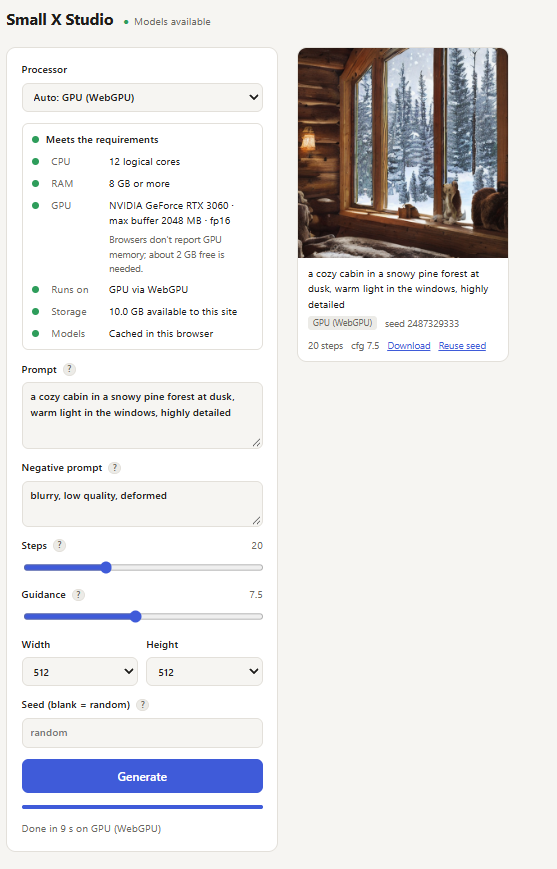
My latest project, Small X Studio, takes that experimentation in a different direction: running an AI image generation model directly inside a web browser.

I was inspired by this project https://webllm.mlc.ai/ which allows you to chat with an an agent locally.

Small X Studio is a self-hosted text-to-image application built using .NET 10, JavaScript, ONNX Runtime Web, and Stable Diffusion.

Unlike traditional AI image generation applications, where your browser sends requests to a back-end running the AI model, Small X Studio performs the actual image generation locally in the browser.

The .NET application serves the website and model files. Once the browser loads the model, the image generation process happens entirely on your device.

This means:

  • No cloud AI inference service is required.
  • No dedicated GPU server is needed.
  • Prompts and image generation remain local to the browser.
  • The application can take advantage of supported GPU hardware through WebGPU.
  • CPU-based execution is available as a fallback.
  • The entire application can be self-hosted using Docker.

Code: https://github.com/xavier-hernandez/small-x-studio

Demo/Test Website: https://small-studio.xavier.cc/


Leave a Comment

Diun – Docker Image Update Notifier

Diun keeps an eye on your Docker images and lets you know when updates are available, so you don’t have to check for new versions yourself.

It automatically checks your container images on a schedule and sends notifications through Discord, Telegram, Gotify, email, and more. It works with Docker, Kubernetes, Nomad, and other container platforms.

What it can do:

  • Checks your container images for updates automatically.
  • Lets you choose which images to monitor.
  • Sends update alerts to your favorite notification services.
  • Supports scheduled checks and detailed logging.
  • Runs as a Docker container or standalone application.

Diun is a simple way to stay on top of container updates without automatically installing them, giving you control over when to update your apps.

Notifications via the following are supported

Leave a Comment

Visual Studio 2026 – “loading document” while trying to use Manage NuGet Packages

I tried several different troubleshooting steps, but the only thing that ultimately fixed the issue was updating Visual Studio to the latest version, 18.10.0. I was previously running 18.9.2.

Before updating, I also ran devenv.exe /resetsettings, which actually seemed to break things further and ultimately led me to update Visual Studio. I’m not sure whether resetting the settings played any role in the fix or if simply updating to 18.10.0 resolved the issue.

Leave a Comment

Supergateway: Makes Self-Hosting MCP Servers Much Easier

I recently came across Supergateway and it solved a problem I was running into with MCP servers.

I was looking for a cleaner way to work with multiple MCP servers without having to install a ton of separate services, keep random background processes running, or execute npx commands all over the server every time I wanted to expose a tool. Supergateway acts as a bridge between stdio-based MCP servers and transports like SSE, WebSockets, and Streamable HTTP, which made things much easier to centralize and manage.

What I found especially useful was being able to take existing MCP servers that normally only run locally over stdio and expose them in a more flexible way for remote access, containers, or shared environments. It simplified the overall setup and made my MCP environment feel a lot more organized instead of having dozens of individually managed processes everywhere.

It also seems to be becoming a pretty common approach in the MCP ecosystem for bridging transports and simplifying deployments, especially in Docker and self-hosted environments.

https://github.com/supercorp-ai/supergateway

Example

 mcp-openweathermap:
    image: supercorp/supergateway:latest
    container_name: mcp-openweathermap
    command: >
        --stdio "npx -y @tristau/openweathermap-mcp --apikey myKey"
        --port 8000
        --outputTransport sse
    ports:
      - 8000:8000        
    restart: unless-stopped
1 Comment

playwright/mcp localhost error

I kept running into a playwright/mcp localhost access issue when trying to connect to the container from outside Docker. By default, the service only allowed connections to localhost:8931, which prevented external access from the host machine or other containers.

After a lot of troubleshooting, this Docker Compose configuration resolved the issue and allowed external connections successfully.

Notes

  • This example uses Chromium in headless mode.
  • Port 8931 is exposed to the host machine.
  • PLAYWRIGHT_MCP_NO_SANDBOX=true can help in certain containerized environments.
  • For production deployments, consider restricting --allowed-hosts instead of using "*".
  mcp-playwright:
    image: mcr.microsoft.com/playwright/mcp
    container_name: mcp-playwright
    entrypoint: ["node", "/app/cli.js"]
    command: 
      - "--host"
      - "0.0.0.0"
      - "--port"
      - "8931"
      - "--allowed-hosts"
      - "*"  # Allows connections from your host machine
      - "--browser"
      - "chromium"
      - "--headless"
    environment:
      - PLAYWRIGHT_MCP_NO_SANDBOX=true
    ports:
      - "8931:8931"
    restart: unless-stopped
Leave a Comment

IPs for Monitoring

Before I lose this list and this post again.

10 to 20 safe high performance IP addresses that can be pinged for monitoring?
byu/ylluminate insysadmin

  • Lumen / Level 3 / Verizon: 4.2.2.2
  • Lumen / Level 3 / Verizon: 4.2.2.3
  • Lumen / Level 3 / Verizon: 4.2.2.4
  • Lumen / Level 3 / Verizon: 4.2.2.5
  • Lumen / Level 3 / Verizon: 4.2.2.6
  • Lumen / Level 3 / Verizon – California: 209.244.0.3
  • UltraDNS: 64.6.64.6 (2620:74:1b::1:1)
  • UltraDNS: 64.6.65.6 (2620:74:1c::2:2)
  • UltraDNS Virginia: 156.154.70.1
  • Dotcom-Monitor/Dallas: 69.162.81.155 (2607:ff68:105::3)
  • Dotcom-Monitor/Denver: 192.199.248.75 (2607:fc88:100:2b::2)
  • Dotcom-Monitor/Miami: 162.254.206.227 (2604:bc80:8001:1064::2)
  • Dotcom-Monitor/Chicago: 209.142.68.29 (2602:fea7:d00::25)
  • Dotcom-Monitor/Minneapolis: 207.250.234.100 (2001:4870:200e:100::2)
  • Dotcom-Monitor/Montreal: 184.107.126.165
  • Dotcom-Monitor/New York: 206.71.50.230 (2604:eb80:1:6::10)
  • Dotcom-Monitor/San Francisco: 65.49.22.66 (2001:470:1:1ab::2)
  • Dotcom-Monitor/Seattle: 23.81.0.59 (2607:f5b2:1:a00b:5::2)
  • Dotcom-Monitor/Washington DC: 207.228.238.7 (2605:4a00:121:f003::2)
  • Google DNS: 8.8.8.8
  • Google DNS: 8.8.4.4
  • Cisco Umbrella/OpenDNS (anycast routing): 208.67.222.222
  • Cisco Umbrella/OpenDNS (anycast routing): 208.67.220.220
  • CloudFlare: 1.1.1.1
  • CloudFlare: 1.0.0.1
  • Norton Connectsafe: 198.153.192.1
  • Norton Connectsafe: 198.153.194.2
  • DNSResolvers.com: 205.210.42.205
  • DNSResolvers.com: 64.68.200.200
  • Quad9: 9.9.9.9 (2620:fe::9)
  • Quad9: 149.112.112.112 (2620:fe::fe)
Leave a Comment

word of the day: Enshittification

Stages and Mechanism of Enshittification

Stage 1: User Enticement: Platforms offer high-quality services,, often at a loss, to attract users and establish high switching costs (lock-in).

Stage 2: Supplier/Business Squeeze: The platform begins to favor business customers (advertisers, sellers) over end-users to increase revenue, while making those businesses dependent on the platform.

Stage 3: Platform Decay: The platform extracts all possible value for shareholders, leaving a degraded experience for both users and business customers.

Leave a Comment

Installing swagger-codegen in Linux and Windows Subsystem for Linux (WSL)

https://docs.brew.sh/Installation

/bin/bash -c "$(curl -fsSL https://raw.githubusercontent.com/Homebrew/install/HEAD/install.sh)"
test -d ~/.linuxbrew && eval "$(~/.linuxbrew/bin/brew shellenv)"
test -d /home/linuxbrew/.linuxbrew && eval "$(/home/linuxbrew/.linuxbrew/bin/brew shellenv)"
echo "eval \"\$($(brew --prefix)/bin/brew shellenv)\"" >> ~/.bashrc
brew install swagger-codegen 
swagger-codegen generate -i /mnt/c/Projects/something\ -\ API/swagger.yaml -l csharp -o /mnt/c/swagger
Leave a Comment

What is my ip address?

Another “what is my ip address” app.

So far I have 2 apps for telling you your IP address.

One can be found here, https://yourip.sh. This is using GO and was forked from ifconfig.io. I wanted to learn GO so I forked that project and made modifications to it.

Such as…

  • Added MaxMind databases
  • Added dark mode
  • Added the ability to add other HTML elements
  • Added integration with plausible analytics

https://github.com/xavier-hernandez/yourip.sh

My other, older, app can be found here https://whatismyip.biz . This app is built in .NET, Blazor client side, running on a Linux server. This is totally custom built.

Both apps above a are docker images that I’ve created as well.

Leave a Comment

MS Dynamics C# retrieving label/name

This is an example of retrieving the label / name of a code instead of writing another function to look it up.

fakecode --> value (int)
fakecode (formatted) --> FormattedValues["fakecode"]

So in C# you can do:

string labelName =  entity.FormattedValues.Contains("fakecode")
? entity.FormattedValues["fakecode"]
: null;

Or

string labelName = entity.FormattedValues.Contains("fakecode")
? entity.FormattedValues["fakecode"].ToEmptyStringIfNull()
: string.Empty;

Leave a Comment

cronicle-x-plus

GitHub: https://github.com/xavier-hernandez/cronicle-x-plus

Docker Image: https://hub.docker.com/r/xavierh/cronicle-x-plus

This docker is based on https://github.com/soulteary/docker-cronicle with some updates. Look there for settings and more info. This was more of a personal repo/image but since it worked and appears to be stable I thought of making it public.

Cronicle was missing a bunch of tools that I wanted. So I added them to the docker image.

Why, because I wanted to 🙂 I tried using different docker containers and calling them from the Cronicle container but it was a headache.

  • updated the docker image to use node:lts-alpine3.22
  • added the following packages
    • bash
    • borgbackup
    • borgmatic
    • mc
    • nano
    • openssh
    • ripgrep
    • rsync
    • wget
Leave a Comment

Adding Packages to Unraid

Adding packages to Unraid is a bit more challenging now that NerdTools is not integrated with Unraid. However, there are few options to add packages to Unraid.

THE DISCLAIMER FIRST

Manually copying .txz into /boot/extra can work, but it’s risky: versions can mismatch, deps may be broken, and recovery requires familiarity with mounting and editing your USB. If you must continue, backup first, verify package contents, and keep a recovery plan ready.

Possible Backup and Recovery Steps

Backup your USB flash
Always make a copy of /config (your flash’s config share) before tinkering. That way, if Unraid refuses to boot after you drop in a bad .txz, you can restore the previous working state.

Have a recovery plan
If your server won’t boot, use Unraid’s Tech-Support Mode or mount the flash on another machine to delete the offending file in /config/extra.


blah blah blah, ok, finally…

#1 Manual – copy the txz file to your /boot/extra directory. You may need to reboot for the changes to take effect. You can download files from https://slackonly.com/pub/packages/15.0-x86_64/ .

#2 Manual from NerdTools – the archive is still available, and the packages are still there. My understanding is that they should still work, https://github.com/UnRAIDES/unRAID-NerdTools/tree/main/packages/6.11 . Same deal as option #1, copy the txz file to your /boot/extra directory. You may need to reboot for the changes to take effect.

#3 un-get – Haven’t used it, but available. https://github.com/ich777/un-get . Install the plugin into Unraid, Plugins -> Install Plugin -> From Url -> https://github.com/ich777/un-get/blob/master/un-get.plg. More info: https://www.reddit.com/r/unRAID/comments/1kccok5/unget_update_script/

Leave a Comment

Upcoming Updates for Azure Pipelines Agents Images – Windows 2019 being deprecated

Upcoming Updates for Azure Pipelines Agents Images

“This deprecation affects Azure DevOps Pipeline customers only if they are using Windows Server 2019 image in a Microsoft Hosted Agent. Please note that it does not impact customers using Windows 2019 in any other Agent (Self-hosted, MDP, VMSS). Refer the guidelines given below to find out the impacted pipelines in your organization. The detailed deprecation plan is outlined below.”

Key Dates:

• Deprecation Start Date: 1st June 2025
• Brownout period: 3rd June 2025 to 24th June 2025
• Full Removal Date: 30th June 2025

Leave a Comment

Azure Pipeline image 20250527.1.0 is missing .NET SDK 9.0.300

I believe this is due to using a .NET Core project using that SDK version. The workaround right now is to add the following task to your pipeline.

For more info: https://developercommunity.visualstudio.com/t/Azure-Pipeline-image-2025052710-is-mis/10913159?sort=newest

Add Task below if using YAML

- task: UseDotNet@2
  inputs:
    packageType: 'sdk'
    version: '9.0.203'

If using the classic UI
Add task → search “Use .NET Core SDK (UseDotNet@2)”

Update the version to 9.0.203. The YAML should look like this.

This option did not work for me.

“Workaround that worked for me is setting a restore property BuildWithNetFrameworkHostedCompiler to true as documented here.
This configures the build to use a matching version of the MSBuild with the latest SDK version installed. By default a version available with installed VS is being used, creating a mismatch.”

You can also search for…

<Project Sdk="Microsoft.NET.Sdk/9.0.203">

and if found, replace it with…

<Project Sdk="Microsoft.NET.Sdk">
Leave a Comment