Skip to content

Category: Microsoft

XRMToolbox – SQL 4 CDS does not open

Had issues getting SQL 4 CDS to open. I tried reinstalling the plugin and the app, and that didn’t work. Finally went to …\AppData\Roaming\MscrmTools\XrmToolBox\Settings and deleted a file there called “MarkMpn.Sql4Cds.xml”. That seemed to have allowed me back in. Looks like it’s a settings file for SQL 4 CDS. After closing XRMToolbox, the file is regenerated.

Do it at your own risk.

Leave a Comment

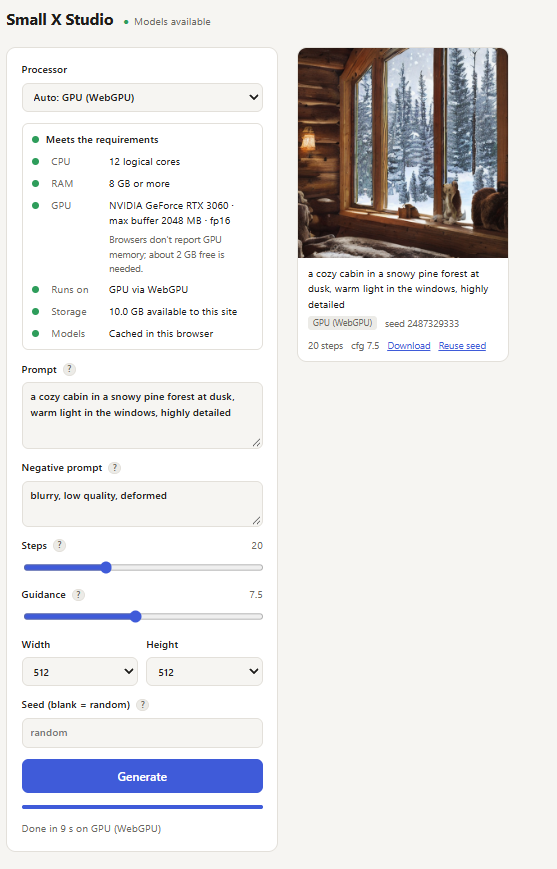
Small X Studio – AI Image Generation Entirely in Your Browser

I’ve been experimenting with running AI models locally, exploring different ways to make AI more accessible without depending on cloud services or dedicated AI servers.

My latest project, Small X Studio, takes that experimentation in a different direction: running an AI image generation model directly inside a web browser.

I was inspired by this project https://webllm.mlc.ai/ which allows you to chat with an an agent locally.

Small X Studio is a self-hosted text-to-image application built using .NET 10, JavaScript, ONNX Runtime Web, and Stable Diffusion.

Unlike traditional AI image generation applications, where your browser sends requests to a back-end running the AI model, Small X Studio performs the actual image generation locally in the browser.

The .NET application serves the website and model files. Once the browser loads the model, the image generation process happens entirely on your device.

This means:

  • No cloud AI inference service is required.
  • No dedicated GPU server is needed.
  • Prompts and image generation remain local to the browser.
  • The application can take advantage of supported GPU hardware through WebGPU.
  • CPU-based execution is available as a fallback.
  • The entire application can be self-hosted using Docker.

Code: https://github.com/xavier-hernandez/small-x-studio

Demo/Test Website: https://small-studio.xavier.cc/


Leave a Comment

Visual Studio 2026 – “loading document” while trying to use Manage NuGet Packages

I tried several different troubleshooting steps, but the only thing that ultimately fixed the issue was updating Visual Studio to the latest version, 18.10.0. I was previously running 18.9.2.

Before updating, I also ran devenv.exe /resetsettings, which actually seemed to break things further and ultimately led me to update Visual Studio. I’m not sure whether resetting the settings played any role in the fix or if simply updating to 18.10.0 resolved the issue.

Leave a Comment

What is my ip address?

Another “what is my ip address” app.

So far I have 2 apps for telling you your IP address.

One can be found here, https://yourip.sh. This is using GO and was forked from ifconfig.io. I wanted to learn GO so I forked that project and made modifications to it.

Such as…

  • Added MaxMind databases
  • Added dark mode
  • Added the ability to add other HTML elements
  • Added integration with plausible analytics

https://github.com/xavier-hernandez/yourip.sh

My other, older, app can be found here https://whatismyip.biz . This app is built in .NET, Blazor client side, running on a Linux server. This is totally custom built.

Both apps above a are docker images that I’ve created as well.

Leave a Comment

MS Dynamics C# retrieving label/name

This is an example of retrieving the label / name of a code instead of writing another function to look it up.

fakecode --> value (int)
fakecode (formatted) --> FormattedValues["fakecode"]

So in C# you can do:

string labelName =  entity.FormattedValues.Contains("fakecode")
? entity.FormattedValues["fakecode"]
: null;

Or

string labelName = entity.FormattedValues.Contains("fakecode")
? entity.FormattedValues["fakecode"].ToEmptyStringIfNull()
: string.Empty;

Leave a Comment

The Windows Subsystem for Linux instance has terminated.

After putting my laptop into hibernation or sleep mode, Ubuntu running on my Windows 11 machine would become unresponsive. Attempting to restart it resulted in the error:

“The Windows Subsystem for Linux instance has terminated.”

After some troubleshooting, I found a way to relaunch it:

Steps to Restart WSL

Open a PowerShell prompt.

Check the status of your WSL instances by running:

wsl -l -v

Example output:

NAME                   STATE           VERSION
* Ubuntu-22.04           Running         2
  docker-desktop-data    Stopped         2


Shut down WSL completely with:

wsl --shutdown

Verify that WSL has stopped by running:

wsl -l -v

Example output:
NAME                   STATE           VERSION
* Ubuntu-22.04           Stopped         2
  docker-desktop-data    Stopped         2


Once WSL has been stopped, you can now reopen Ubuntu, and it should work as expected.

Leave a Comment

Install MS Dynamics CRM Tools

Had to do this recently.

Got this code from https://crmtipsbyprm.wordpress.com/2018/06/22/download-dynamics-365-tools-from-nuget/

Works out of the box.

$sourceNugetExe = “https://dist.nuget.org/win-x86-commandline/latest/nuget.exe”
$targetNugetExe = “.\nuget.exe”
Remove-Item .\Tools -Force -Recurse -ErrorAction Ignore
Invoke-WebRequest $sourceNugetExe -OutFile $targetNugetExe
Set-Alias nuget $targetNugetExe -Scope Global -Verbose

##
##Download Plugin Registration Tool
##
./nuget install Microsoft.CrmSdk.XrmTooling.PluginRegistrationTool -O .\Tools
md .\Tools\PluginRegistration
$prtFolder = Get-ChildItem ./Tools | Where-Object {$_.Name -match ‘Microsoft.CrmSdk.XrmTooling.PluginRegistrationTool.’}
move .\Tools\$prtFolder\tools\*.* .\Tools\PluginRegistration
Remove-Item .\Tools\$prtFolder -Force -Recurse

##
##Download CoreTools
##
./nuget install  Microsoft.CrmSdk.CoreTools -O .\Tools
md .\Tools\CoreTools
$coreToolsFolder = Get-ChildItem ./Tools | Where-Object {$_.Name -match ‘Microsoft.CrmSdk.CoreTools.’}
move .\Tools\$coreToolsFolder\content\bin\coretools\*.* .\Tools\CoreTools
Remove-Item .\Tools\$coreToolsFolder -Force -Recurse

##
##Download Configuration Migration
##
./nuget install  Microsoft.CrmSdk.XrmTooling.ConfigurationMigration.Wpf -O .\Tools
md .\Tools\ConfigurationMigration
$configMigFolder = Get-ChildItem ./Tools | Where-Object {$_.Name -match ‘Microsoft.CrmSdk.XrmTooling.ConfigurationMigration.Wpf.’}
move .\Tools\$configMigFolder\tools\*.* .\Tools\ConfigurationMigration
Remove-Item .\Tools\$configMigFolder -Force -Recurse

##
##Download Package Deployer
##
./nuget install  Microsoft.CrmSdk.XrmTooling.PackageDeployment.WPF -O .\Tools
md .\Tools\PackageDeployment
$pdFolder = Get-ChildItem ./Tools | Where-Object {$_.Name -match ‘Microsoft.CrmSdk.XrmTooling.PackageDeployment.Wpf.’}
move .\Tools\$pdFolder\tools\*.* .\Tools\PackageDeployment
Remove-Item .\Tools\$pdFolder -Force -Recurse

##
##Remove NuGet.exe
##
Remove-Item nuget.exe
Leave a Comment