

I got sent a referral link. I get something and you get 50% off the pro subscription.
https://gitkraken.cello.so/H2BnWQEpis5
or just check it out here without the referral link https://www.gitkraken.com
Leave a CommentAll the junk I have in my head
I got sent a referral link. I get something and you get 50% off the pro subscription.
https://gitkraken.cello.so/H2BnWQEpis5
or just check it out here without the referral link https://www.gitkraken.com
Leave a CommentSometimes, when trying to shut down or stop your array, you’ll get this error: “Problem stopping array—Retry unmounting user share(s).” It might be because something still has a connection to the server or share. You can try the following to kill the process that is causing the array not to stop.
ps -ef | grep /mnt/user
Find the process that is using the mount, then do
kill <PID>
Leave a CommentAfter putting my laptop into hibernation or sleep mode, Ubuntu running on my Windows 11 machine would become unresponsive. Attempting to restart it resulted in the error:
“The Windows Subsystem for Linux instance has terminated.”
After some troubleshooting, I found a way to relaunch it:
Steps to Restart WSL
Open a PowerShell prompt.
Check the status of your WSL instances by running:
wsl -l -v

Example output:

NAME                   STATE           VERSION
* Ubuntu-22.04           Running         2
  docker-desktop-data    Stopped         2
Shut down WSL completely with:
wsl --shutdownVerify that WSL has stopped by running:
wsl -l -v

Example output:
NAME                   STATE           VERSION
* Ubuntu-22.04           Stopped         2
  docker-desktop-data    Stopped         2
Once WSL has been stopped, you can now reopen Ubuntu, and it should work as expected.
I create a folder structure when creating branches, xavier/xxxx. I wanted to delete all those branches since they were old. I ended up doing it one by one, no matter what tool I used, and it was taking too long.
Here is a Powershell script that helped.
# Get all remote branches, filter for those starting with "xavier/"
$branches = git branch -r | Where-Object { $_ -match 'xavier/' } | ForEach-Object {
    # Remove any leading/trailing whitespace and remove the "origin/" prefix
    $_.Trim() -replace '^origin/', ''
}

# Loop through each branch and delete it from the remote repository
foreach ($branch in $branches) {
    git push origin --delete $branch
}
So, I had a backup that went wrong, and I just wanted to delete the bucket altogether, but I kept getting errors via the web GUI.
I googled a bit and found that you can set expirations for your bucket. Maybe in 2 days, it’ll delete the files on its own, but I didn’t want to wait.
I downloaded the Windows CLI tool from https://www.backblaze.com/docs/cloud-storage-command-line-tools.
Open a command prompt and run the exe, b2-windows.exe. You’ll see a bunch of flags, etc.
Log in to your account by running this command
.\b2-windows.exe account authorize [applicationKeyId] [applicationKey]
Next, run this command
.\b2-windows.exe rm –versions –recursive “b2://bucket-name”
It’ll take time, depending on the number of files you have. You should see a counter as it reads through the bucket.
Leave a Commenthttps://github.com/xavier-hernandez/csv_to_parquet_dotnet
Converts a csv to a parquet file, per the delimiter, in .NET.
Nuget packages used
This solution which is “as-is” converts a CSV file into a Parquet file. I created this because I could not find anything .NET based or Windows based that I could use to convert a file. ‘
The solution requires an input file, output file, error file, delimiter, and has header (true/false). If the files does not have a header than a fake header is created for the output file. The file is processed under the assumption that all the columns are strings. If an error occurs for a row then that row is written to the error file to be manually looked at. These errors occur sometimes if the row doesn’t match the columns already created by the first row of data.
The only other Windows app I could find was this https://superintendent.app but you need to load all the data then export it.
Further enhancements:
Found this docker cheat sheet at www.DataCamp.com
https://xavier.cc/wp-content/uploads/2024/08/Docker_for_Data_Science_Cheat_Sheet_2-2.pdf
Leave a CommentI was getting this error in Unraid.
nchan: Out of shared memory while allocating channel /cpuload. Increase nchan_max_reserved_memorySeems like having something to do with having multiple tabs open for the same web instance.
I was able to fix it by restarting nginx.
/etc/rc.d/rc.nginx restartLately, I’ve had problems mounting shares on a different Unraid server. It seems that sometimes, when doing parity rebuilds or stopping and starting the array multiple times, NFS stops working. The web UI doesn’t let you know this is happening and doesn’t reflect on there.
So… I open up a terminal and enter this command to restart NFS.
/usr/local/etc/rc.d/rc.nfsd restartWhile moving/upgrading stuff I temporarily had to use 2 GPUs on my server; however, I want to use the AMD GPU to transcode now that it’s somewhat supported.
Using the Plex template from lscr.io/linuxserver/plex
I added a device variable called
Config 1 – card0 is my AMD GPU
Name: /dev/dri
Value: /dev/dri/card0
Config 2 – /dev/dri/renderD128
Name: whatever, called it “AMD”
Value: /dev/dri/renderD128
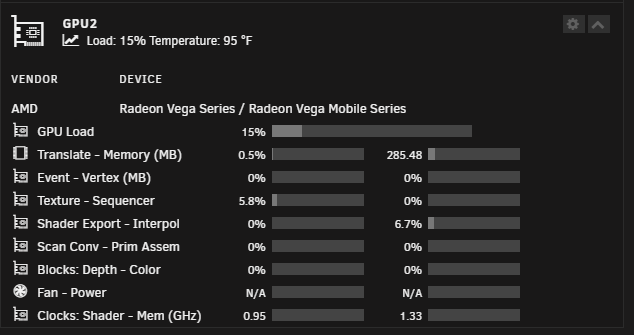
I was able to put some load on it by watching Live TV.
Don’t forget to install Radeon-TOP.
Found this interesting post that helped me set it up.
https://forums.unraid.net/topic/53944-how-to-shutdown-2-servers-on-1-ups
Leave a CommentYes, if you are using the unraid stock ups software (apcupsd). On the slave server set the cable type to Ether, the ups type to Net, and the device to <master_server_name_or_ip>:3551
Make SURE that the conditions to shutdown are set to keep the master on long enough to allow the slave server to shutdown first.
Personally, I have the master machine set to shut down after 300 seconds on battery, and the slave after 270 seconds. If the power around here is off more than a minute, it’s going to be out a while.
BTW, this also works for VM’s. I have apcupsd set up in all my VM’s to initiate shutdown after 60 seconds of no power, so they have plenty of time to finish up what they are doing and shutdown cleanly before unraid pulls the rug out from under them
#!/bin/bash
# Define the directory to search (you can change this to the desired directory)
DIR="/temp"

# Array of file extensions to delete
EXTENSIONS=("*.txt" "*.srt" "*.nzb" "*.sup" "*.ac3" "*.dts" "*.sample.*" "*.srr")

# Counters for deleted files and directories
deleted_files=0
deleted_directories=0

# Loop through the array and delete the files, counting each deletion
for EXT in "${EXTENSIONS[@]}"; do
    count=$(find "$DIR" -type f -name "$EXT" -print -delete | wc -l)
    deleted_files=$((deleted_files + count))
done

# Find and delete empty directories, counting each deletion
count=$(find "$DIR" -type d -empty -print -delete | wc -l)
deleted_directories=$((deleted_directories + count))

# Output the counts
echo "Deleted $deleted_files files with extensions ${EXTENSIONS[*]}."
echo "Deleted $deleted_directories empty directories."
For the most up-to-date version, follow the links below.
https://snippets.cacher.io/snippet/b554e570d8ffc0431ad9
https://gist.github.com/xavier-hernandez/f4979b4ce174068ce5428a26ae08be32
Leave a CommentOne of my BTRFS pools, which was RAID 1 corrupted and wouldn’t mount.
I want to say docker updates overloaded the size of the docker file.
I probably did this all wrong, but I got a lot of the data from it, so I provided some commands that might help others in the future.
Make sure to put Unraid into maintenance mode.
Below are just examples since I didn’t record exactly what I did.
To mount the degraded RAID configuration. Choose the primary partition/drive to mount somewhere.
#mount degraded RAID
mount -o degraded /dev/mapper/[partition] /mnt

# to unmount
umount /mnt
To check the filesystem and hopefully fix the filesystem issue.
#shows you the filesystem
btrfs fi show /dev/sdd

#starts the scrub process
btrfs scrub start /mnt

#checks the scrub process status
btrfs scrub status /mnt
You can also use this to monitor the status instead of running the last line above over and over again.
#this will check the status of the scrub every second

watch -n 1 btrfs scrub status /mnt
I was told not to use this since it might screw up the filesystem, but my filesystem was already screwed up 🙂 This checks and tries to repair the filesystem.
btrfs check --repair /dev/sddAn excellent way to figure out your developer journey. Many roadmaps to help you learn.
Leave a CommentI recently started hosting a website and didn’t realize it was throwing the error below in Chrome.
The site you just tried to visit looks fake. Attackers sometimes mimic sites by making small, hard-to-see changes to the URL.
After a lot of googling, I finally found an answer on how to get rid of it. I just started the process and will update the post later to see if it worked.
Leave a CommentGot this error, “Could not find a part of the path … bin\roslyn\csc.exe“. I guess the answer is to just do a REBUILD, maybe a clean solution first but REBUILD solution works.
Or try this in the Package Manager Console:
Update-Package Microsoft.CodeDom.Providers.DotNetCompilerPlatform -rSo I got this error on my Unraid server for a drive, “Unmountable: Volume not encrypted” for a drive I had used on another server. There was nothing on the drive I wanted so I just wanted to overwrite or format it.
Finally found a link to just overwrite the filesystem.
https://unix.stackexchange.com/questions/315063/mount-wrong-fs-type-bad-option-bad-superblock
mkfs.ext4 /dev/sXXX
Leave a CommentI had to write some code to ingest a CSV file, and this made it so much simpler. This nuget package is open source as well https://github.com/JoshClose/CsvHelper.
https://joshclose.github.io/CsvHelper/
Leave a Comment